Skip to main content Skip to footer
Menu
Rates illustration banner Rates illustration banner

Paying your rates FAQs

We offer a range of payment options to make paying your rates as simple and flexible as possible.

The easiest way is through Payble, our online payment platform, which allows you to spread your payments across the year and helps avoid late payment penalties.

You can also choose to pay:

  • Online using internet banking
  • In person at our offices (Whakatāne, Rotorua, Tauranga) using EFTPOS or cash
  • At an NZ Post Shop using your rates invoice

For internet banking, you’ll need to include your valuation reference and property details so your payment can be correctly matched to your account.

For security reasons, we do not accept credit card payments over the phone, as this does not provide a sufficient audit trail.
Regional Council rates are invoiced once a year, with key dates throughout the rating year (1 July – 30 June):

  • September – Rates invoices are sent
  • 20 October – Payments are due (unless you’re on a payment plan)
  • 31 October – A 10% instalment penalty is applied to unpaid balances
  • 30 June – Final payment date for customers on flexible payment plans

If you haven’t received your invoice by the end of September, you should contact us so we can ensure your details are correct.

You don’t need to pay your full rates in one lump sum.

By setting up a flexible payment plan through Payble, your payments are spread across the rating year to 30 June. This makes it easier to manage payments and prevents late payment penalties, as long as your plan is maintained.

You can also set up your own automatic payments through internet banking, however:

  • These payments are not monitored by Council
  • You are responsible for ensuring your balance is fully paid by the due date
  • Penalties may still apply if the account is not cleared on time

For most customers, Payble is the simplest way to stay on track and avoid additional costs.

You can view your current and recent rates information in a few ways.

  • Your current rates can be viewed online through the Rating Information Database (RID) or by visiting one of our offices in Rotorua, Tauranga, or Whakatāne
  • Your previous rates are available through the property search function on our website
  • You can check your current balance and payment activity through Payble, our online payment platform.

Simply log in using your phone or computer and view your balance and payment progress at any time. If you set up a flexible payment plan, you will also receive email or text reminders when payments are due

Using your valuation reference (found on your rates invoice) will give you the most accurate results when searching for your property.

Unlike city or district councils, which often issue multiple instalments, we issue a single annual invoice.

This approach is used to:

  • Keep administration costs lower, helping reduce overall rates
  • Align with the standard approach used by most regional councils
  • Reflect that Regional Council rates are generally lower than city or district council rates, making a single invoice more manageable

If paying in one amount doesn’t suit your circumstances, you can set up a flexible payment plan through Payble to spread payments across the year.

We do not offer early payment discounts, as these can disadvantage customers who are unable to pay upfront and are not considered a fair approach across all ratepayers

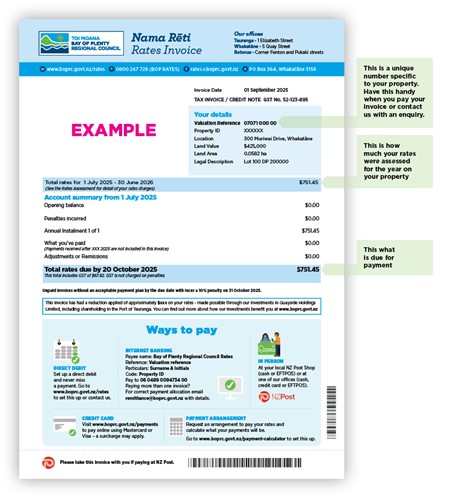
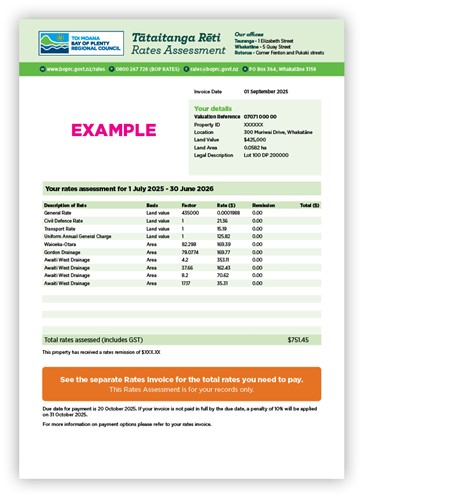
Regional Council rates are issued as one invoice per year, usually in September. Your invoice includes two key documents, a rates invoice and rates assessment.

Your Rates Invoice shows how much you need to pay, when it’s due, and payment options.

Rates invoice

Your Rates Assessment provides a breakdown of the rates being charged and how they are calculated.

Because invoices are sent in stages across different areas of the region during September, you may not receive yours at the same time as others.

You can also choose to receive your invoice by email and opt to have your city or district council invoice sent electronically as well.

If you haven’t received your rates invoice, the quickest way to request a copy is by using the rates online query form.

You can use the same form to:

  • Request a copy of your current invoice
  • Ask for a statement of your account

If you’re expecting an invoice and it hasn’t arrived, it’s a good idea to check that your contact details are up to date, especially your postal or email address.

By law, rates invoices must be issued to the ratepayer, who is the person listed on the valuation roll and legally responsible for paying the rates. This is usually the property owner (or in some cases, a registered leaseholder).

You can request for your invoice to be sent ‘care of’ another person, such as:

  • A property manager
  • Accountant
  • Tenant

However, the ratepayer remains responsible for ensuring the invoice is paid, so using a ‘care of’ address can increase the risk of missed payments.

You can choose to receive your invoice by:

  • Email (up to two email addresses), OR
  • Post

If a ‘care of’ mailing address is used, all future rates correspondence will be sent to that address.

If you own more than one property, and they are held under separate titles (rating units), we are required to issue separate rates invoices for each property.

However, in some situations you may be eligible for contiguous rating, where properties are treated as one for rating calculation purposes.

To qualify, the properties must:

  • Have the same ownership
  • Be next to each other (or separated only by features like a road or river)
  • Be used together as a single unit

If approved, some charges (such as the Uniform Annual General Charge and certain targeted rates) may only be applied once. However, you will still receive separate invoices for each title.

If you think this may apply to you, you can apply using the relevant application form or contact us for guidance. Different rules may apply in some cases (such as farming properties).

Failing to pay rates

If your rates are not paid by the due date, a 10% penalty is added to the unpaid balance on 31 October. This is applied in line with Council policy and helps ensure fairness across all ratepayers.

If rates remain unpaid, additional penalties may be added to arrears balances during the year, increasing the total amount owing over time.

We understand that situations can change, so if you’re unable to pay:

  • You can set up a flexible payment plan using Payble, which spreads your payments across the year and helps avoid penalties
  • If you are struggling to pay your rates, and a flexible payment plan doesn’t suit you needs, let us know by completing the alternative payment arrangement form and we will do our best to help you.

An additional 10% arrears penalty will be added to any arrears that remain unpaid by July and January each year. 

If you’ve received a penalty but believe you have already paid, this is usually due to a timing or payment matching issue.

Common reasons include:

  • The payment was made after the due date
  • The payment has not yet been processed or allocated
  • The reference details didn’t match the correct property

For us to attempt to locate this payment, please complete the online rates query form and tick the 'have received a penalty notice'. We can investigate this for you, but we’ll need details such as:

 How the payment was made (e.g. online banking, Payble)

  • The date and exact amount
  • The payment reference used 

If we’re able to locate the payment and confirm it was made on time, the penalty will be removed.

Because rates are charged separately by your Regional Council and your city or district council, payments sometimes get made to the wrong place.

If this happens:

  • You’ll need to request a refund from the council you paid
  • Refunds are returned directly to you, not transferred between councils
  • You should contact the correct council to explain the situation and confirm when payment will be made

Refunds can take several working days to process, so it’s important to act quickly to avoid penalties on the correct account.

Once the correct payment is received, we can review and remove any penalty applied due to the delay.

In some circumstances, you may be able to apply for a penalty remission under Council’s policies. To request a review:

  • The outstanding balance must be paid, or
  • A payment arrangement must be in place

Each request is assessed individually, taking into account the reason for non‑payment and whether it meets the remission criteria. Remissions are not automatic, but we will consider your situation fairly and in line with policy.

If you believe you meet the criteria for a penalty to be remitted, you need to submit a written application by completing the online rates query form and tick 'have received a penalty notice'.

Before requesting the penalty to be removed you must pay the outstanding balance or set up a suitable payment arrangement using Payble, out online payment platform.

If something doesn’t look right:

  • Contact us so we can review your account and explain the charges
  • If the issue relates to settlement or ownership changes, you may also need to check with your lawyer

If you wish to formally dispute your rates or how they have been applied, you can raise this with us directly.

You also have the option of contacting the Ombudsman, an official who investigates complaints from members of the public about the decisions or conduct of government bodies and officials.  You can freephone on 0800 802 602 or email info@ombudsman.parliament.nz. You can also visit the Ombudsman website at www.ombudsman.parliament.nz